Refract
A research workspace for reading papers, saving evidence, comparing sources, and running analysis without losing the working context that connects those steps.
Research work often breaks across PDFs, notes, comparison tables, datasets, and analysis notebooks. Once those pieces separate, conclusions become difficult to trace back to source material.
Refract treats the session as the main object. Papers, saved passages, comparison outputs, uploaded files, and analysis runs all belong to the same working frame.
A Next.js and FastAPI application with reader, compare, and statistics surfaces backed by persistent project/session state.
Role: I designed and built the session model, reader flow, evidence storage, comparison surfaces, and analysis structure.
A research workspace for keeping evidence and analysis together
Refract starts from a practical observation: research work becomes fragile when papers, notes, comparison tables, datasets, and model outputs are scattered across separate tools.
The session is the central object. It holds the research goal, source material, saved evidence, comparisons, uploaded datasets, and statistical runs in one durable frame.
The problem is loss of traceability, not just information overload
The design problem is not simply information overload. It is the loss of traceable connection between stages of work.
The project began from a practical gap in research workflows. Reading, note-taking, comparison, and data analysis often happen in different places. That separation is manageable at first, but it becomes fragile when a later conclusion has to be checked against the original passage, dataset, or assumption that produced it.
Refract addresses that gap by making the research session the primary object. A session carries the goal of the work, the papers under review, saved evidence, comparison outputs, uploaded datasets, and the record of statistical runs. The application is not only a cleaner interface over separate tasks. It is an attempt to keep the chain of work intact long enough for later review.
The session connects the literature and analysis tracks
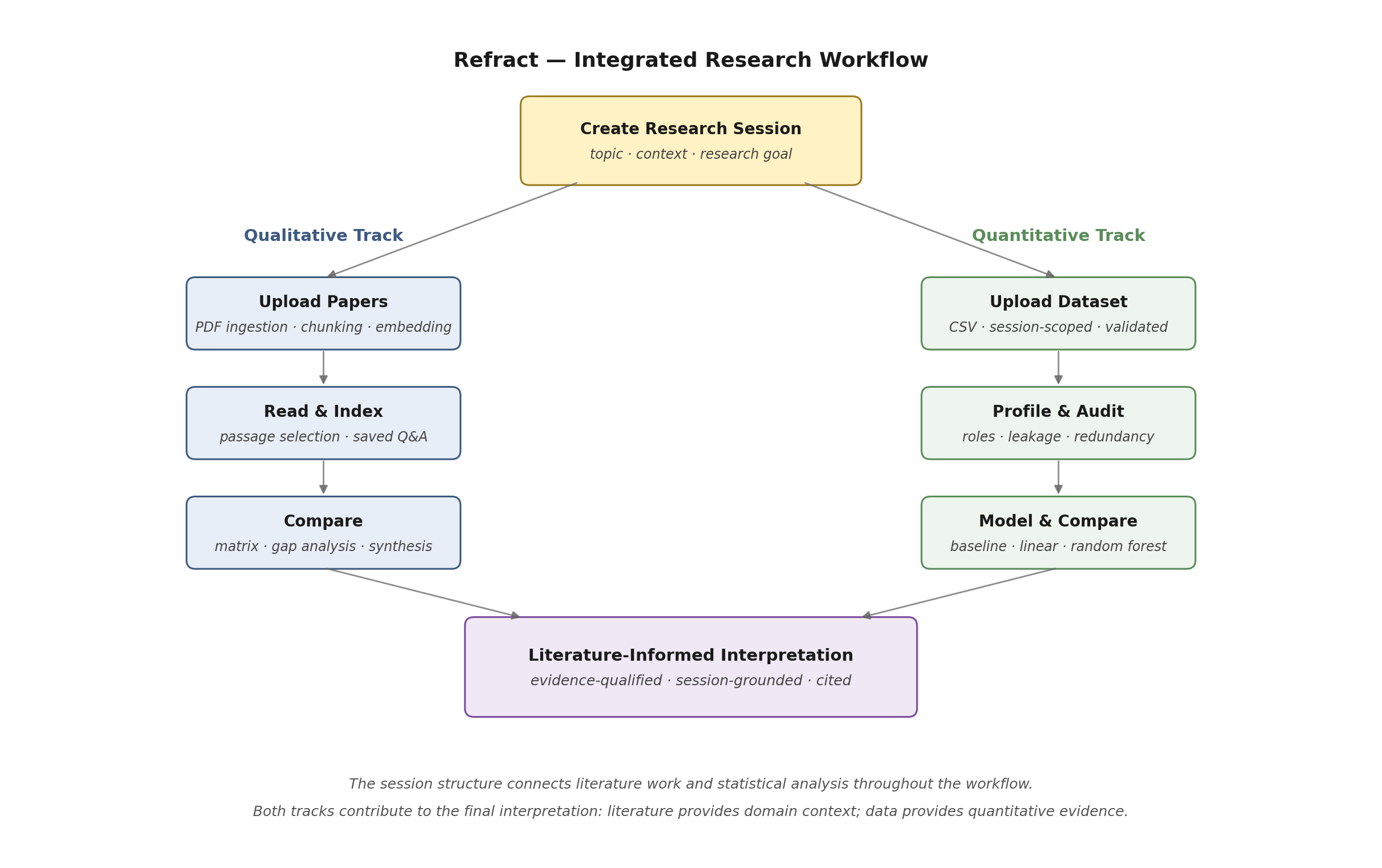
The workflow diagram from the repository README captures the core structure of the product. Literature ingestion, reading, and comparison occupy one side of the system; dataset upload, profiling, audit, and modeling occupy the other. Both feed the same session and the same interpretation layer.
Workflow overview from the Refract repository README.
The product is organized around explicit research moves
Each major surface exists to preserve one kind of work without detaching it from the surrounding session.
Document-grounded reading
Papers, highlights, notes, and source-linked responses remain tied to the document instead of being flattened into generic chat history.
Structured synthesis
Cross-paper analysis stays attached to the active research question, which makes agreement, contrast, and gaps easier to evaluate.
Session-scoped analysis
Dataset profiling, audit checks, modeling, and interpretation belong to the same frame as the literature that motivated them.
Persistent provenance
The application stores papers, evidence, files, and analysis runs in a way that makes later conclusions traceable.
The data model carries the research context forward
The important product decision is that generated outputs remain attached to the conditions that produced them.
The central design decision in Refract is that context should be stored, revisited, and reused as the work evolves. When a passage is saved, a comparison is generated, or a dataset is profiled, the result remains attached to the session that produced it. That keeps later reasoning anchored to evidence, settings, and source material instead of turning the application into a polished interface for disconnected outputs.
This affects the architecture. The frontend needs explicit research surfaces rather than a single chat shell. The backend needs a model that can relate papers, extracted evidence, uploaded files, and analysis runs. The application also needs provenance strong enough for a later conclusion to be traced back through the chain of reading, comparison, and model evaluation that produced it.
Document work remains passage-level and inspectable
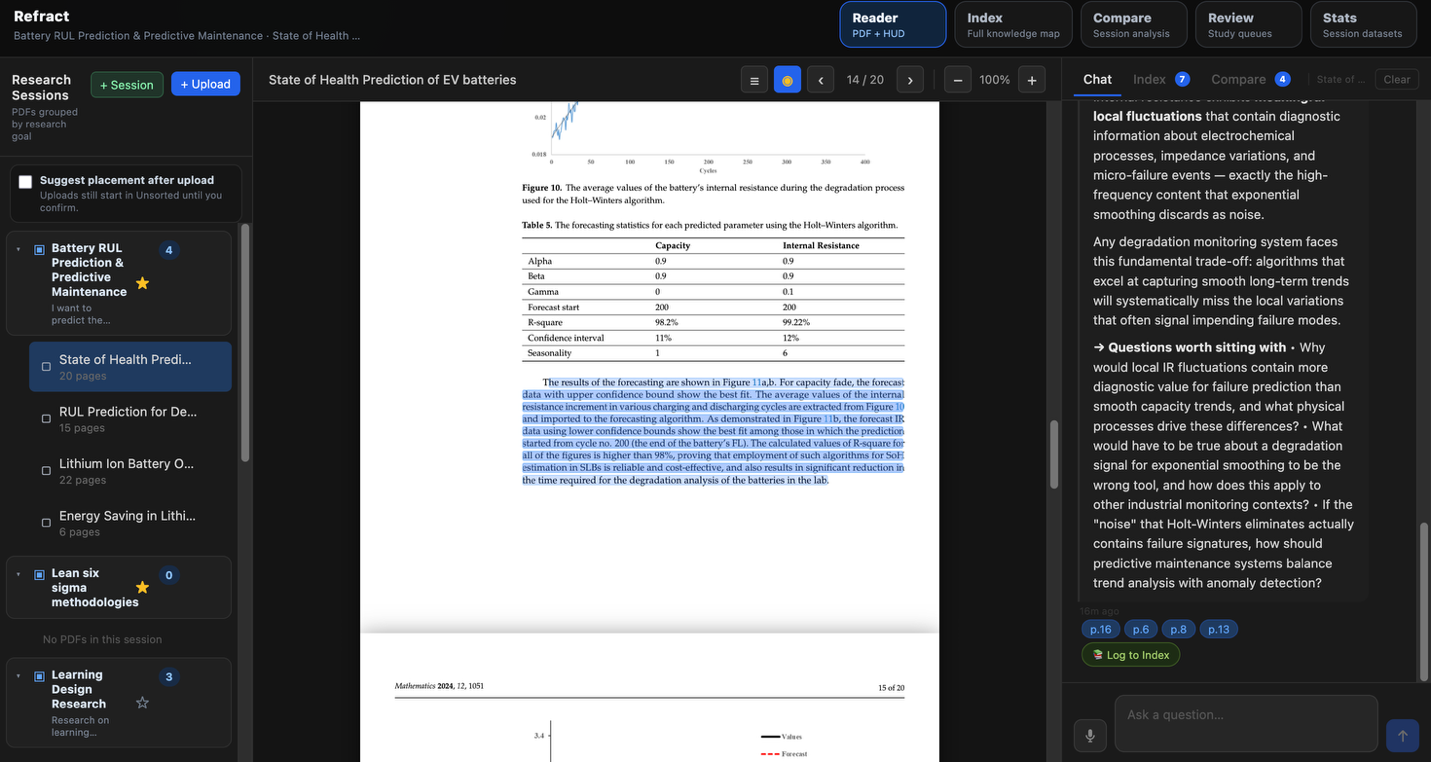
The reading interface is designed for active work rather than passive storage. PDFs, highlights, saved notes, and source-linked responses all stay close to the document rather than being flattened into generic chat history.
Reader workspace captured from the live repository README.
Cross-paper synthesis stays tied to the active research question
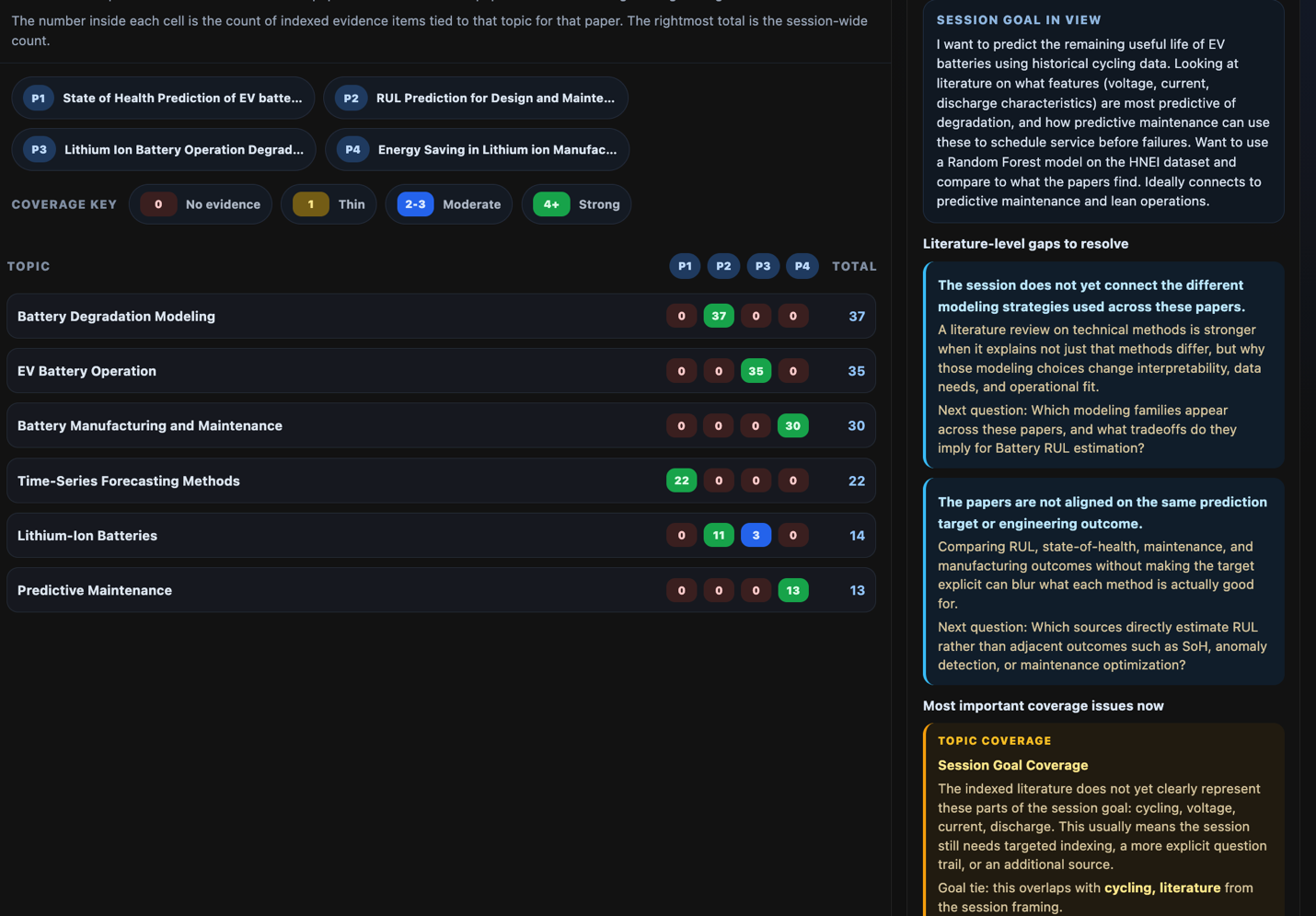
Comparison is treated as structured synthesis rather than a one-off answer. The interface keeps the current research goal visible and organizes agreement, contrast, and coverage across the source set, which makes the output easier to evaluate and revise.
Comparison workspace from the repository README.
A session is more useful than a conversation log
The application is designed as a working frame rather than a transcript of model turns.
A conversation log remembers turns. A research session can hold the goal of the work, the relevant papers, the evidence already extracted from them, the comparisons run against the current question, and the statistical artifacts that emerge later. That difference is what makes later interpretation more disciplined rather than merely more convenient.
Statistical interpretation is presented with its surrounding evidence
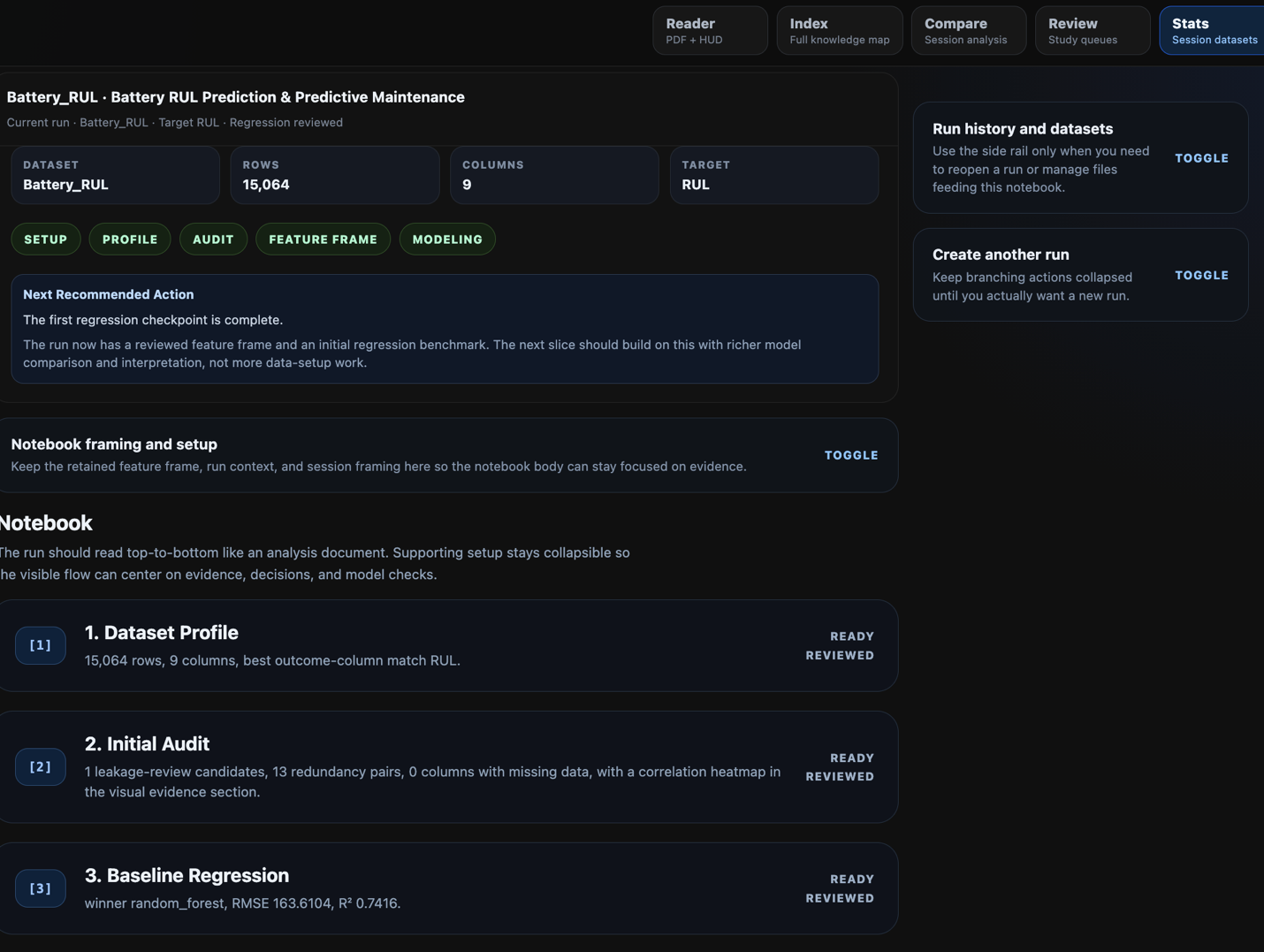
The statistical workspace provides a structured layer for profiling, auditing, modeling, and interpreting results inside the same research frame as the supporting literature.
Stats workspace from the repository README.
How work moves through the system
The important architectural choice is not just what tools exist, but that each stage inherits context from the one before it.
Ingest and frame the session
A research goal, source set, and initial working context establish the frame for the rest of the work.
Read at passage level
Highlights, notes, and saved evidence remain attached to the document rather than being summarized away.
Synthesize across sources
Comparison inherits the active question and source set, which makes the resulting analysis easier to inspect.
Run analysis inside the same frame
Datasets, profiles, audits, and model comparisons remain adjacent to the literature and assumptions that motivated them.
Keep interpretation traceable
Later conclusions can be checked against the evidence, files, and analytical steps that produced them.
The technical structure mirrors the workflow structure
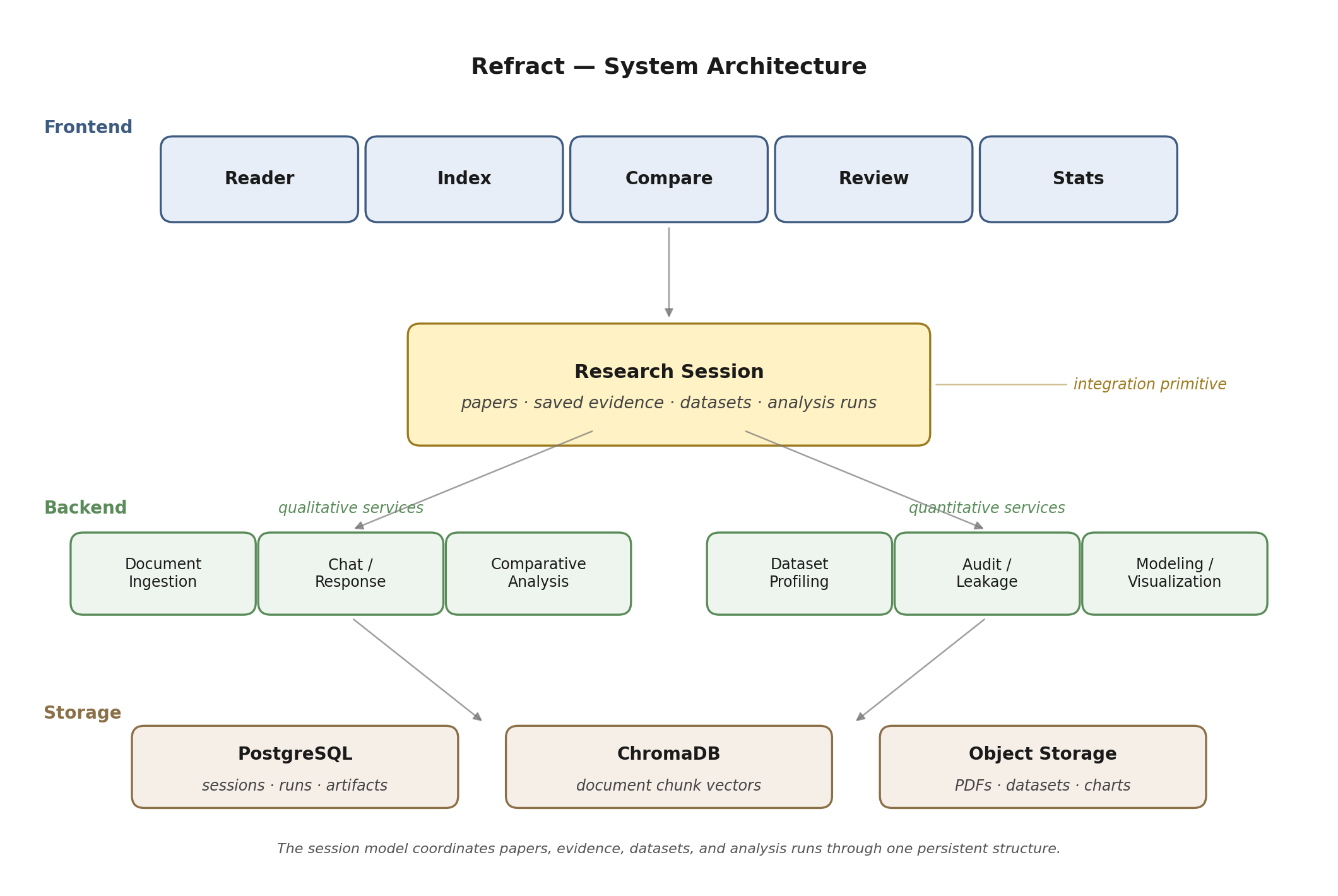
The repository architecture separates interface, services, storage, and retrieval layers, but the important seam is the research session that coordinates them. That shared model is what allows the application to carry context forward instead of forcing users to rebuild it at each step.
System architecture diagram from the Refract repository README.
README appendix
The curated project page above is the main reading path. The imported README is kept as source context for readers who want to compare the portfolio narrative with the repository record.
Open imported README
Refract
Refract is a session-centered research workspace for literature review and statistical analysis. It keeps papers, saved evidence, datasets, and analysis runs inside one continuous environment so qualitative reading and quantitative modeling do not have to be reconstructed across separate tools.
The current implementation is built around an Industrial and Systems Engineering workflow: upload papers into a research session, extract and organize evidence, compare sources against a live research goal, attach a dataset to the same session, and run a staged analysis flow that surfaces profile, audit, model, and interpretation outputs with explicit provenance.
<p align="center"> <img src="docs/readme-assets/workflow-overview.png" alt="Refract integrated research workflow" width="900" /> </p>Why Refract
Applied research work is usually split across PDF readers, note-taking tools, spreadsheets, notebooks, and writing documents. That separation creates friction:
- reading notes drift away from the passages that produced them
- cross-paper synthesis gets rebuilt from scattered fragments
- statistical interpretation is often written after the fact, without the literature context that should shape it
Refract addresses that by making the research session the continuity layer. The same session holds the papers being read, the evidence saved from those papers, the dataset being analyzed, and the run history used to interpret the results.
What The App Does
Reader: upload PDFs, read them in-app, select passages, and generate passage-grounded responses from the active document.Index: turn saved questions, notes, concept tags, and source-linked responses into persistent research memory.Compare: build structured cross-paper synthesis through matrices, topic coverage, and gap analysis tied to the session goal.Review: surface study queues and review artifacts built from saved evidence.Stats: attach a session-scoped dataset and run a staged quantitative workflow for profiling, audit, modeling, and interpretation.Research session backbone: keep the qualitative and quantitative tracks connected through one shared session object rather than separate project fragments.
Screenshots
<p align="center"> <img src="docs/readme-assets/reader-workspace.png" alt="Reader workspace" width="48%" /> <img src="docs/readme-assets/index-workspace.png" alt="Index workspace" width="48%" /> </p> <p align="center"> <img src="docs/readme-assets/compare-workspace.png" alt="Compare workspace" width="48%" /> <img src="docs/readme-assets/stats-workspace.png" alt="Stats workspace" width="48%" /> </p>System Architecture
<p align="center"> <img src="docs/readme-assets/system-architecture.png" alt="Refract system architecture" width="900" /> </p>The live implementation is organized around a few concrete seams:
- frontend/src/App.jsx: workspace shell that exposes
Reader,Index,Compare,Review, andStats. - backend/app/main.py: FastAPI entrypoint that wires PDF, chat, highlight, review, research-session, data-file, and analysis routes.
- backend/app/models/research_session.py: session model that coordinates papers, datasets, and analysis runs.
- backend/app/services/comparative_analysis_service.py: cross-paper synthesis layer for session-aware compare output.
- backend/app/services/analysis_execution_service.py: staged analysis execution, including profiling and audit flow.
- backend/app/services/analysis_models_service.py: regression-model benchmarking and model output generation.
- backend/app/services/analysis_evidence_service.py: evidence provenance labels for statistical interpretation.
At runtime, the app uses React/Vite in the frontend, FastAPI in the backend, PostgreSQL for relational state, ChromaDB for document-vector storage, and object storage for uploaded files and generated artifacts.
Current Demonstration Scope
The primary end-to-end quantitative demonstration in the current project is Battery Remaining Useful Life prediction. The Stats workspace is designed to keep that analysis inside the same session as the supporting literature, so the interpretation layer can reconnect modeling decisions to the papers already in scope.
This repository is best understood as an active research prototype rather than a polished general-purpose analytics platform. The strongest implemented thread is the integrated workflow itself: literature-grounded reading, persistent indexing, structured comparative synthesis, and session-scoped quantitative analysis.
Quick Start
Prerequisites
- Node.js for the frontend dev server
- A Python environment that satisfies backend/requirements.txt
- PostgreSQL running on
localhost:5432 - ChromaDB available on
localhost:8001 - A populated
backend/.envfile
Local Development
- Copy the example environment file and fill in the required values:
cp backend/.env.example backend/.env
- Start the local stack from the repo root:
./start.sh
- Open the app at http://localhost:5173.
Useful helper scripts:
./status.shchecks PostgreSQL, ChromaDB, backend, and frontend status../stop.shstops the local services started bystart.sh.
Docker Compose
If you prefer containers, the repository also includes docker-compose.yml:
cp backend/.env.example backend/.env
docker-compose up --build
This brings up:
- frontend on
http://localhost - backend on
http://localhost:8000 - PostgreSQL on
:5432 - ChromaDB on
:8001
Environment Notes
The backend environment file currently expects values for:
ANTHROPIC_API_KEYOPENAI_API_KEYTAVILY_API_KEYAWS_ACCESS_KEY_IDAWS_SECRET_ACCESS_KEYS3_BUCKET_NAMEDATABASE_URL
Full functionality depends on those services being configured, especially for file storage and AI-assisted response paths.
Repository Layout
frontend/          React + Vite workspace shell and UI components
backend/           FastAPI app, models, routers, and research services
docs/              planning notes, implementation notes, and README assets
playwright-tests/  browser probes and workflow verification scripts
research/          project notes, literature framing, and decision logs
scripts/           small project-specific utilities
Important Notes
- Some internal file names and scripts still use the earlier working label
pdf-workspace; the product name isRefract. - The screenshots and diagrams in this README reflect the current research workflow and Battery RUL demonstration used in the project deep-dive material.